Rust Toolkit: Aimbot, ESP and World Overlays
Understand Rust aimbot, player ESP, resource markers and world overlays. Compare feature groups and follow links to requirements and product details.
This Rust toolkit guide explains the feature groups used in the catalog so you can compare controls without treating every label as a separate product. Start with the information you need to understand, then follow the linked articles for terminology and requirements. The descriptions summarize the listing; they do not establish current compatibility or account safety.
Rust toolkit: Separate targeting and information
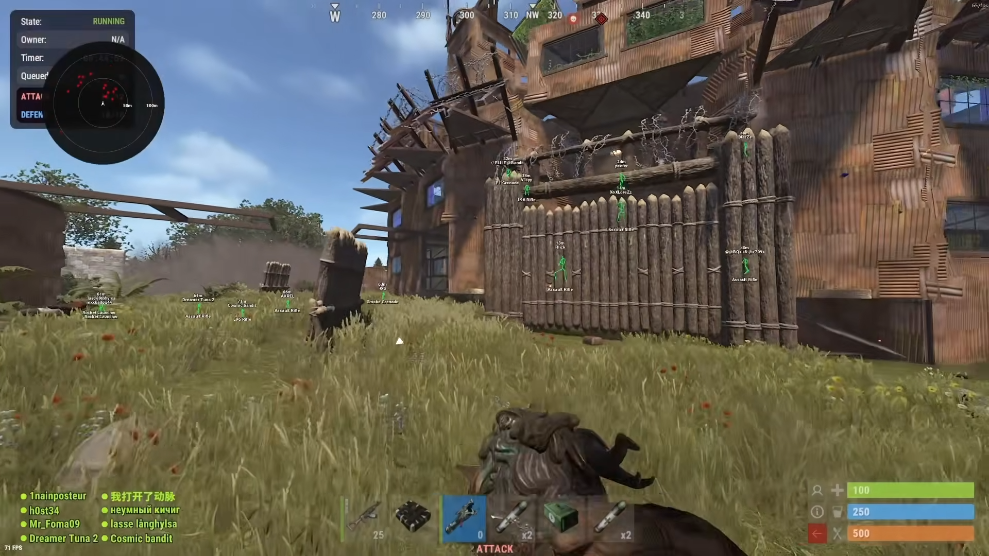
Targeting controls and information overlays serve different purposes. The listed aiming options include field of view, smoothing, aim bone and an activation key. Player overlays describe information such as names, health, held equipment and distance. Review these categories separately when comparing a package. The presence of one feature does not establish how another behaves or which controls are available on a current build.
Compare resource and world markers
Resource categories include sulfur, metal and stone nodes, collectables and animals. World categories include hidden stashes, tool cupboards, traps, dropped items and vehicles. Check which entities a listing actually names rather than assuming that a broad overlay label covers everything. Distance limits, colors and category filters help explain how the controls organize a busy scene.
Read weapon and display options in context
Weapon modifiers, miscellaneous settings and visual controls belong to separate groups in the reference. Read their descriptions together with any stated limits. A screenshot illustrates a display but does not prove that every shown option is available on your computer. Use the feature guide to understand the groups and compare them with the product catalog.
Check requirements before access plans
The Rust listing names Windows 10/11, Intel/AMD processors and security prerequisites. Cloud DMA is stated as required for full functionality on supported builds. Review the configuration checklist before comparing durations. Monthly and lifetime access refer to plans for the listed package, rather than proof of different feature tiers. Ask support about unclear requirements or current build status before making a decision.